THE AI OFFICE FOR SMALL BUSINESSES

AI does the groundwork.
You sign off.

Your own AI agents and workflows read, sort, calculate and draft – for invoices, enquiries, quotes and sales, using your company knowledge. You decide what goes out.

On your computer or serverLocal AI optionE-invoicing, SEPA & DATEVWith mobile app
FROM INBOX TO APPROVAL↓

OVERVIEW · 2 MINUTES

A working day
with DENKRAUM AI.

Mornings in the Team Cockpit, enquiries in the inbox, leads in the pipeline, drafts with approval: this is how Mira Hoffmann works – self-employed, building Shopify shops. Recorded in the real app, with narration and subtitles in German.

German audio2:00
A working day with DENKRAUM AI
Transcript (English translation)

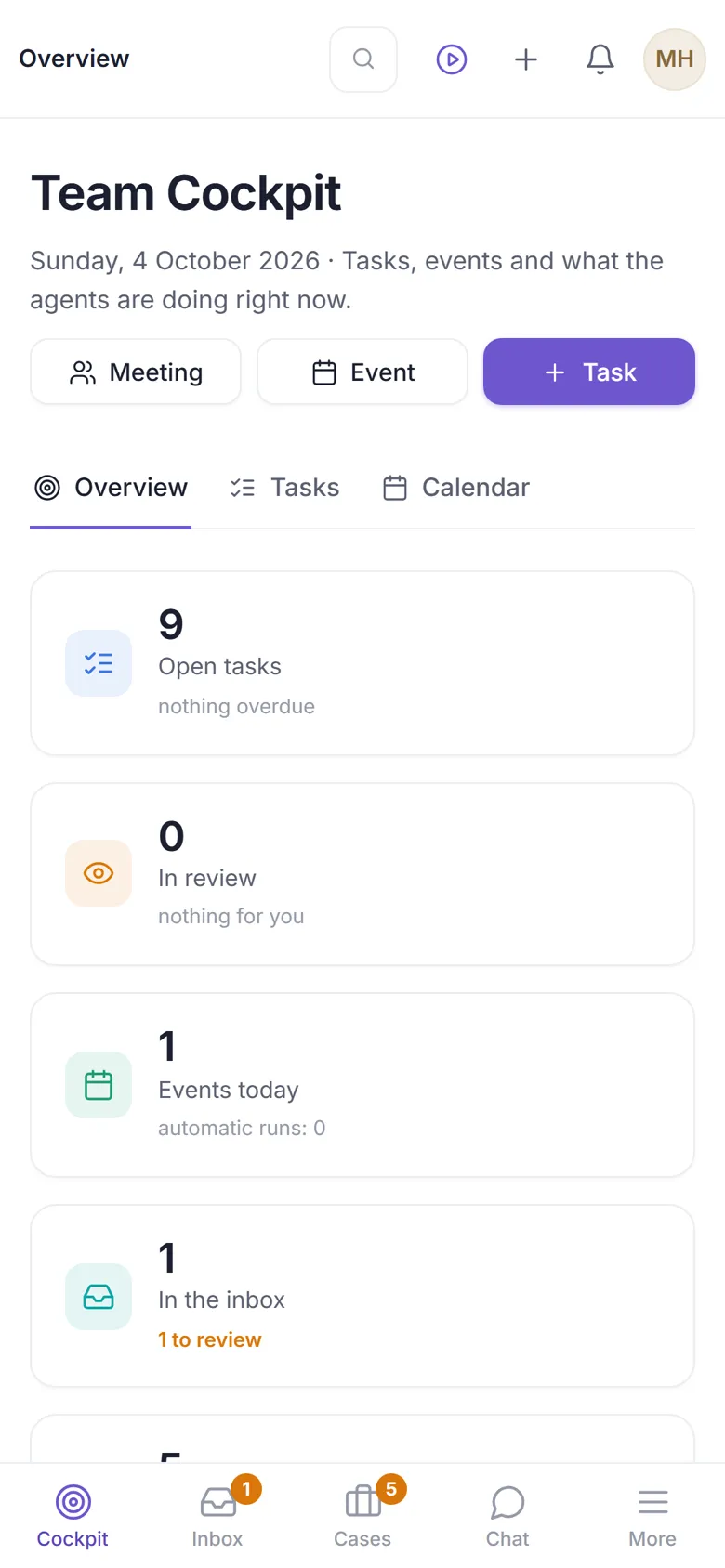
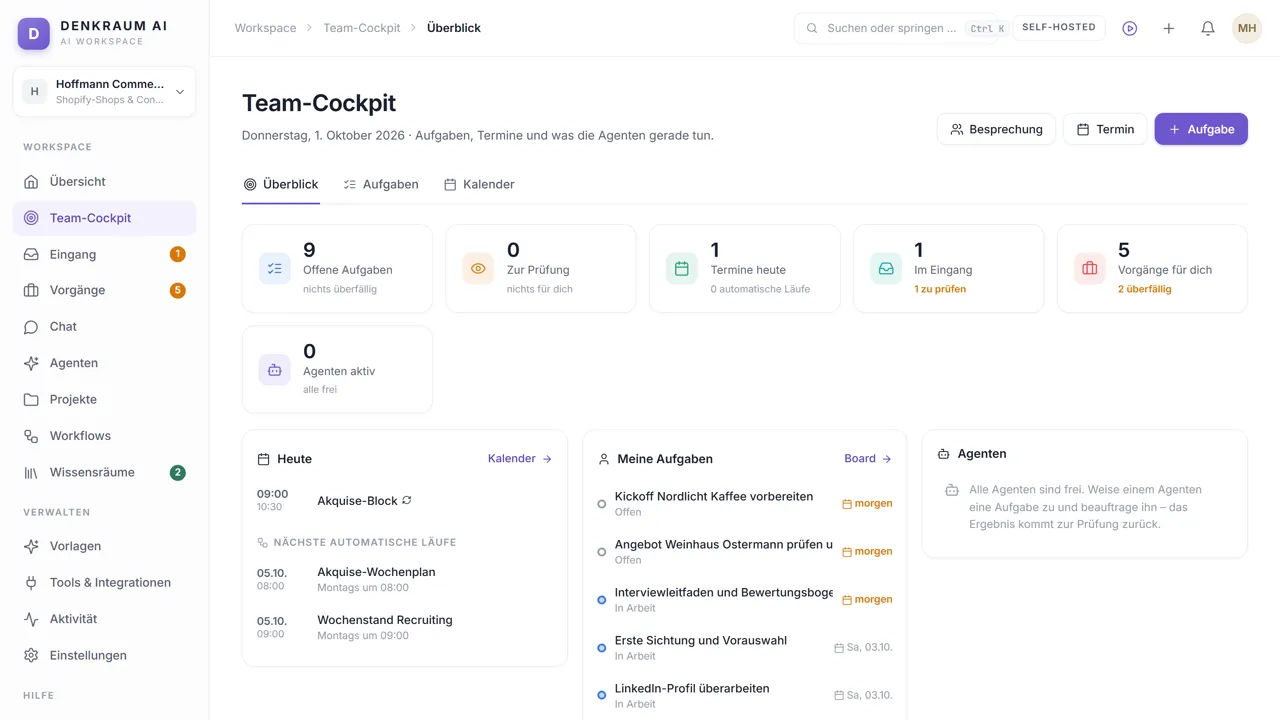
In the morning, Mira starts in the Team Cockpit. At a glance she sees what is coming up: open tasks, events, the inbox – and every case with a step that is due. Anything overdue is at the top, such as the follow-up with Kranich Tee. And recurring runs like the weekly sales plan are already scheduled. Everything that comes in lands in the inbox: emails, scans, forms and call notes. DENKRAUM AI classifies every item – this job application, for example, is automatically confidential. Enquiries become cases: invoices, tickets, applications – and leads in the sales pipeline. Every lead has a stage, a value and the next step with a date. At the top you see the open leads, the weighted value and the win rate. In the chat you work with agents, for example the sales coach. It knows your knowledge, your tasks and the pipeline – and shows you where its answers come from. Workflows handle recurring work step by step, from checking a lead to the quote. And before anything goes out, they ask you. The knowledge spaces describe how you work: playbook, prices and text templates. Agents suggest additions – but they only count once you approve them. And you start new projects with a template. Knowledge, agents, workflows and first tasks are set up in two minutes.

WHAT DENKRAUM AI TAKES OFF YOUR PLATE

Five tasks
you face every day.

Work arrives by email, by phone or through the scanner. DENKRAUM AI sorts it, prepares it and does the maths – you check and approve. Every video shows the real app with sample data.

01 · Inbox

Everything that comes in, in one place.

Emails from your mailboxes, scans, photographed receipts, forms and call notes land in the inbox. DENKRAUM AI classifies every item and turns it into work: an invoice, a lead, a ticket or a task.

  • Mailboxes via IMAP, Microsoft 365, Gmail or Zoho
  • Uncertain and confidential items land under “To review”
  • “If … then …” rules with a test run
More on the AI inbox
0:58
The inbox
Transcript

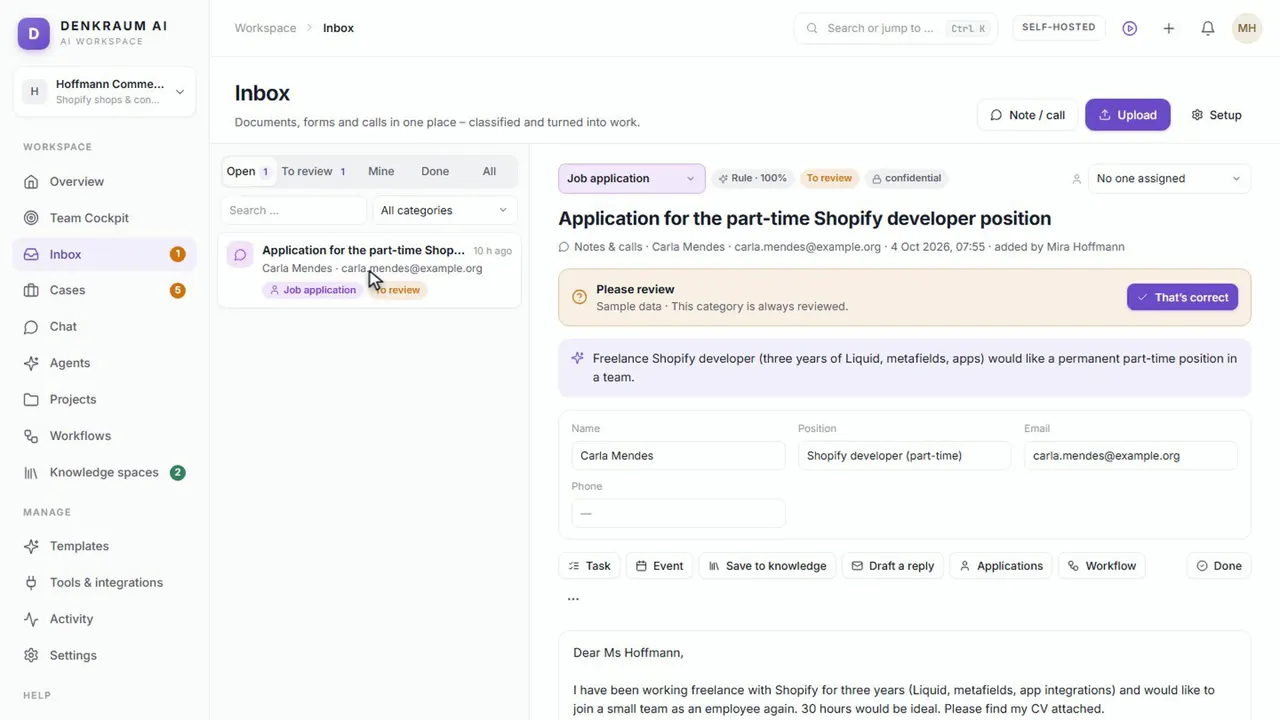
The inbox collects everything that comes in – and turns it into work. Emails from your mailboxes, uploaded documents, scans, forms and call notes all land here, in one place. Every item is classified – first by rules, then by the model. Uncertain or sensitive cases land under “To review”. This application is confidential and is always reviewed. “That’s correct” confirms the classification – and a case is created from it. Every item turns into work: a task, an event, a note in your knowledge, a reply or a workflow run. Under “All” you also see what’s been dealt with – like the enquiry from Seidenweg Mode, which has already become a lead.
02 · Invoices

Review, approve, pay.

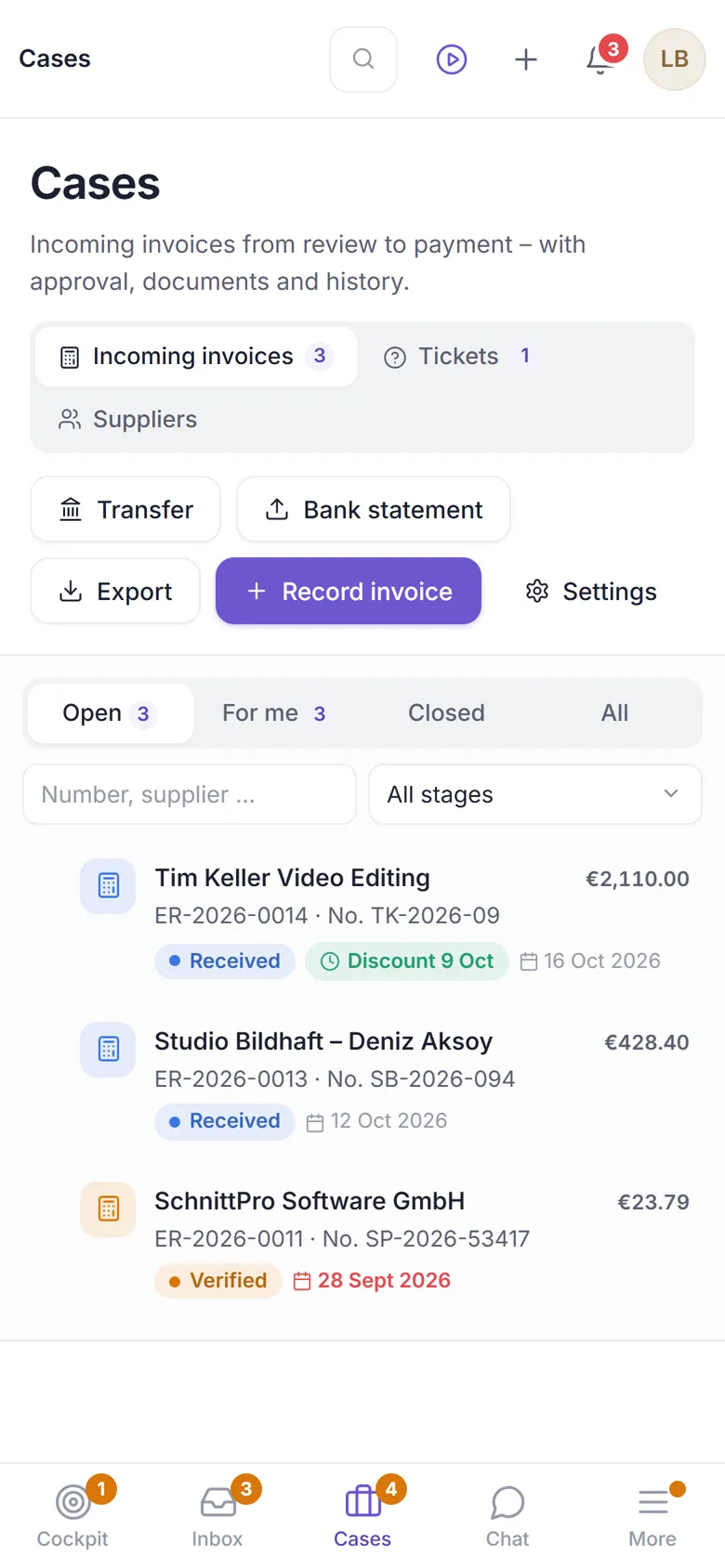
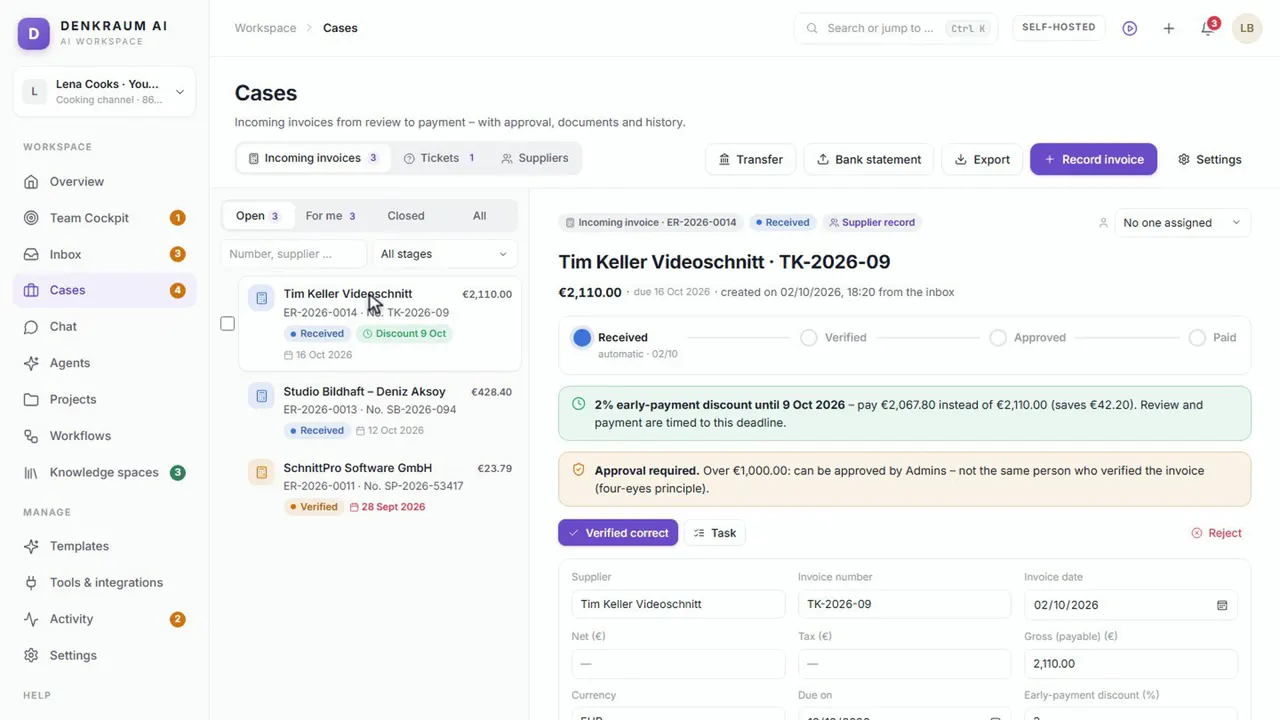
DENKRAUM AI reads the amount, due date and IBAN from the invoice – including e-invoices and scans. Every invoice goes through factual review and approval to payment, early-payment discounts included.

  • Four-eyes principle above a set amount, warning when an IBAN changes
  • SEPA bulk transfer for online banking, DATEV export for your tax adviser
  • Bank statements are matched to payments, the subscription radar flags price increases
More on e-invoicing
0:56
Incoming invoices
Transcript

Invoices from the inbox become cases – all the way to payment. Every invoice gets a number and goes through the stages one by one: Received, Verified, Approved and finally Paid. DENKRAUM AI reads the amount, due date and IBAN from each invoice – including e-invoices and scans – and spots early-payment discounts, with a reminder. You verify the invoice and approve it – above a set amount with the four-eyes principle. A changed IBAN is flagged to you straight away. Approved invoices go to online banking as one SEPA batch transfer – each on its deadline, with the discount. For your tax adviser there’s the DATEV export. And a bank statement matches the payments to the invoices.

03 · Enquiries and quotes

From the phone call to a precisely calculated quote.

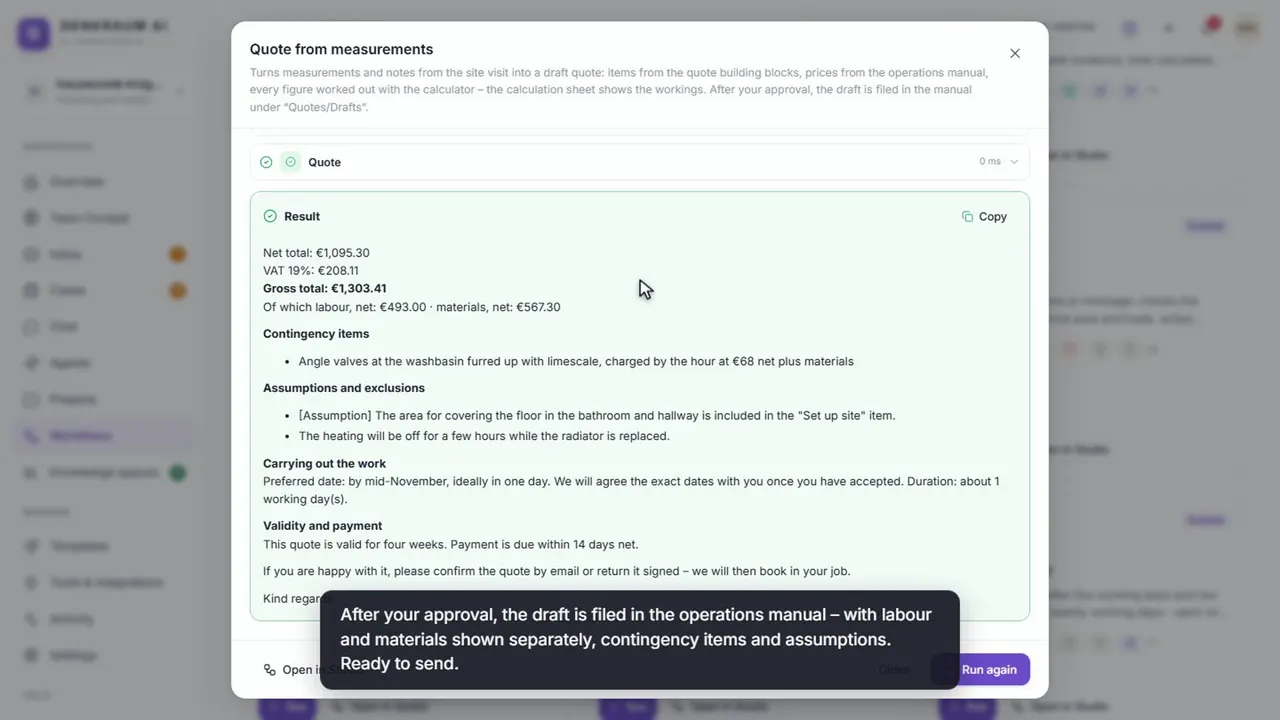
Take the enquiry, clarify open questions, calculate the quote after the site visit: the assistant picks verified building blocks from your company handbook and calculates every line item with the calculator. Before it goes out, you check line items and totals.

  • Calculation sheet showing every step, with labour and material share
  • Every job in the pipeline – from enquiry to confirmation
  • Shown with a plumbing and heating business as the example
More on quotes with AI
1:05
The quote from the measurements
Transcript

Your measurements become a quote – calculated exactly. After the site visit, you give the “Quote from measurements” workflow your notes: the quantities, the materials Mr Winkler has chosen and what needs checking during the work. The Quote assistant picks the matching building blocks and works out every item with the calculator: time times hourly rate plus material – chosen materials with a 15 percent mark-up. Before anything goes out, you check the items and totals. The calculation sheet shows how every figure is calculated – and a note reminds you while the blocks are still starting values. After your approval, the draft is filed in the operations manual – with labour and materials shown separately, contingency items and assumptions. Ready to send.

04 · Sales

Every lead with a value and a next step.

Enquiries from the inbox become leads in the pipeline. You see open leads, the weighted value and the win rate – and the cockpit reminds you of every step that is due. Agents check new leads and draft messages; nothing goes out without your approval.

  • Board with stages, probability and deal value
  • “Lost” with a reason – so you can learn from it
  • Templates for freelancers and sales teams, with forecast
More on sales with AI
0:50
Leads in the funnel
Transcript

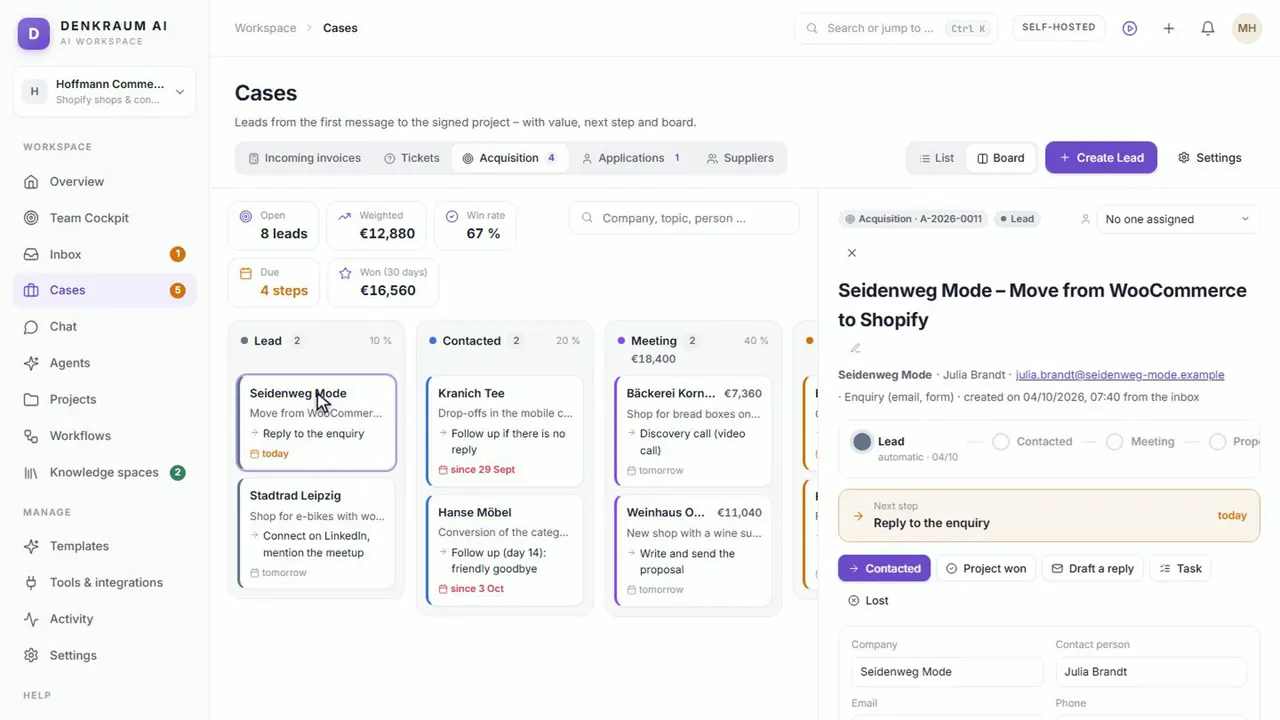
In the funnel, you follow every lead until the project is won. Under “Cases” you choose the “Acquisition” funnel. The board shows every stage – from Lead through Meeting to Proposal. The key figures are at the top: open leads, the weighted value, the win rate and what’s due today. One click opens the record: contact, history, notes and the next step with its date. Once the step is done, you move the lead on – here to “Contacted”. The Team Cockpit reminds you of the next step. Won or lost? The funnel records both – a lost lead with its reason, so you can learn from it.

05 · Service

Enquiries and complaints, through to the solution.

Support messages become tickets with a priority and a response time. When time runs short, the ticket escalates. Draft replies are written from your knowledge and from solved tickets – and a good solution can become knowledge itself.

  • Customer replies land back on the ticket
  • Solved tickets close themselves after a week
  • Send directly from your mailbox – only when you click
More on customer service with AI
0:44
Tickets
Transcript

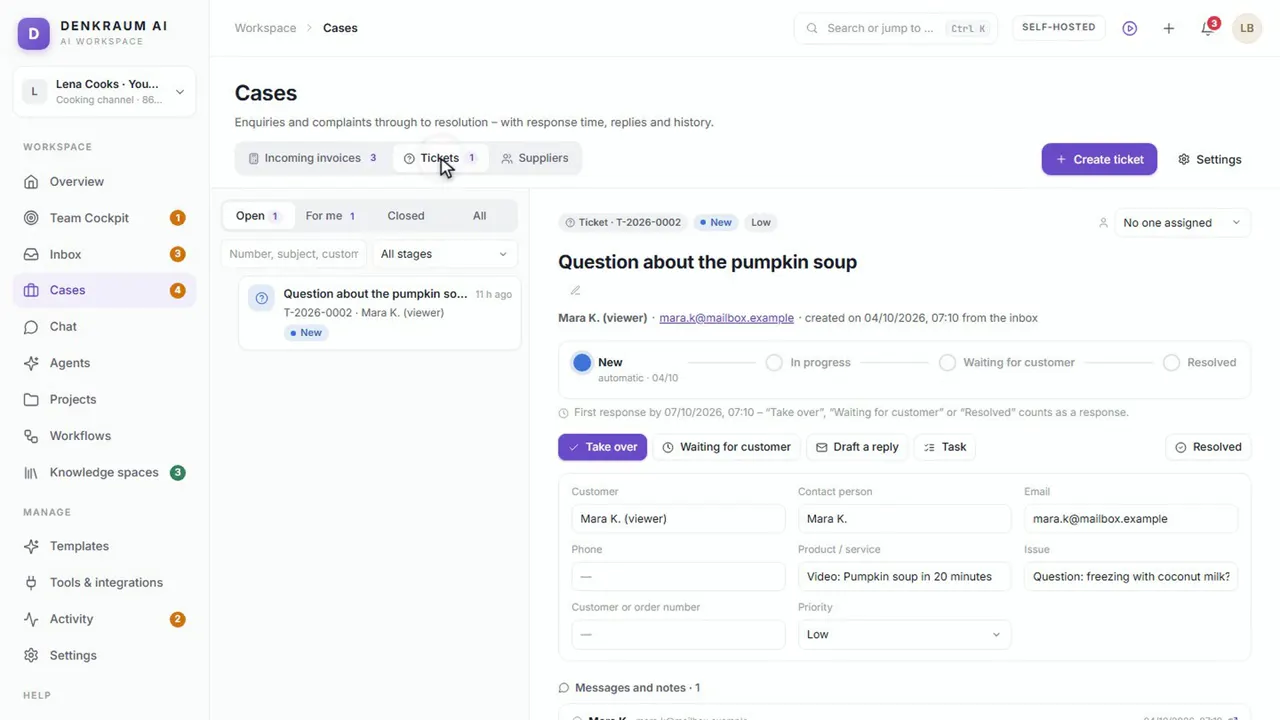
Support enquiries become tickets – with a response time. Every enquiry gets a number and a priority. The response time is tracked – once it’s exceeded, the ticket is escalated. With “Take over”, the ticket becomes yours. The stages show where it stands: New, In progress, Waiting for customer or Resolved. “Draft a reply” writes an answer using your knowledge and resolved tickets. When the customer replies, it lands back on the ticket. Once a ticket is resolved, the solution can become knowledge if you like – and the ticket closes by itself after a week.

The videos were recorded in the real app. The voice is AI-generated, and the companies and people in the examples are fictitious.

TEMPLATES

Ready-made
for your industry.

A template sets everything up in a few minutes: a handbook with your rules, agents, workflows, starter tasks and fixed dates. You provide a few details such as your name, offer and target group – and they appear everywhere. Every template is available in English and German.

0:38
Setting up templates
Transcript

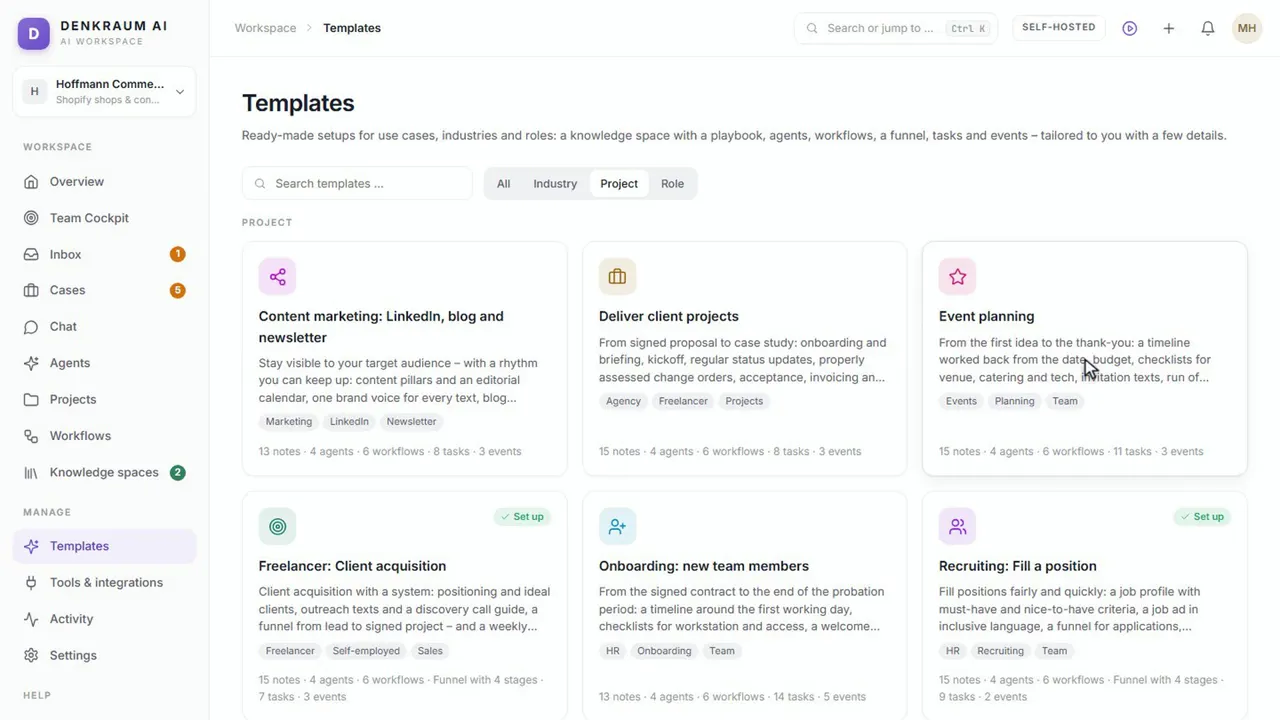
With a template, you’re up and running in minutes. There are templates for industries such as trades businesses or property management, for roles such as project management – and for projects such as recruiting. The preview shows what gets set up: a knowledge space with a handbook, agents, workflows, starter tasks and fixed events. A few details are enough – they then appear everywhere. And the workflows come with examples, so you can try them out right after setting up.

Industry

  • Trade businessEnquiry to order, quote from the site measurement
  • Estate agentProperty to completion, exposé and viewings
  • Property managementDamage reports, tradespeople, owners’ meetings

Role

  • Sales teamPipeline, qualification and forecast
  • Customer serviceTickets, complaints, reply templates
  • Project managementMinutes, risks, status reports
  • Product ownerStories, change requests and sprints at a software service provider

Project

  • Freelancer: winning clientsSales playbook, leads, follow-ups
  • Delivering client projectsBriefing, status emails, sign-off
  • RecruitingFilling a position, applications from the inbox
  • OnboardingGetting new colleagues started
  • Content marketingLinkedIn, blog and newsletter
  • Event planningTasks scheduled backwards from the date

ALWAYS WITH YOU

In the office, in the team
and on the go.

Desktop app for Windows

Installs like an office program. Your data sits in a folder of your choice, and backups run automatically every day.

Your team on the network

One switch shares DENKRAUM AI on your local network. Your team signs in through the browser – with roles from admin to reader.

Mobile app without an app store

On iPhone and Android as an app on the home screen: cockpit, inbox, cases and chat, photograph receipts directly, push notifications for anything important.

Or on your own server

For larger teams, DENKRAUM AI runs on a server of your own – no cloud lock-in, with local models if you wish.

PRODUCT FILM · 1:30 MIN.

DENKRAUM AI
in 90 seconds.

From chat with sources to the learning centre: nine short chapters show how agents, knowledge and approvals work together. No sound, with subtitles.

0:00 / 1:30
Intro

DENKRAUM AI is the AI workspace for teams who want to keep their knowledge in their own hands: self-hosted, with local language models if you wish.

Chapters

    All sample companies, names and figures in the film are fictitious. Keyboard: the space bar plays and pauses, the arrow keys change the chapter.

    EVERYTHING CONNECTED

    Scattered knowledge
    becomes shared strength.

    Your AI knows the right sources. Your agents handle recurring tasks. And good solutions stay with your team.

    01 / 04

    A good answer starts with your knowledge.

    Specialised agents use your price lists, rules and documents. That is how a customer enquiry becomes a draft quote you can trace line by line.

    • Your own agents for tasks and teams
    • Sources and context right in the chat
    • Combine models and tools as needed

    In the example: the quote assistant for Elektro Schneider.

    Chats & agents · Screenshot from the demo
    More views:

    LESS SEARCHING. MORE DONE.

    One space to think.
    Many ways to use it.

    Start where routine work costs time today. With a concrete workflow and the knowledge your team already has.

    Examples from the demo. The companies and people shown are fictitious.

    LIVING KNOWLEDGE

    Good answers
    are the start.
    Better knowledge
    is the result.

    A fault that was fixed. A new costing rule. A frequent question. DENKRAUM turns them into proposals for your shared knowledge.

    Your team decides what counts.

    How you stay in control ↗
    01

    Capture experience

    Agents recognise new solutions, corrections and open questions.

    02

    Review together

    Your team compares the proposal with the existing knowledge and approves it.

    Reviewed by a person
    03

    Use it every day

    Approved insights are available in future answers – with source and version.

    04

    Make quality visible

    Test questions and knowledge checks help you spot gaps and outdated content.

    YOUR KNOWLEDGE STAYS YOURS

    AI with possibilities.
    And clear limits.

    You decide where DENKRAUM runs, which models you connect and what your agents are allowed to do.

    On your server

    Self-hosted on your infrastructure. With local models, the AI processing can also run within your own network.

    With your approval

    Changes to knowledge are proposals. For critical steps, you build human approval into the workflow.

    With traceable sources

    Sources, note versions and the activity history make answers and changes verifiable.

    With open knowledge

    Markdown instead of a closed repository. Obsidian-compatible and connectable to your systems via MCP or HTTP.

    With external model providers, data processing depends on your configuration and your contracts with the provider. We will work out the right operating concept with you. More on local AI

    LEARN

    72 short videos.
    Right in the app.

    Under “Help → Learn”, six courses guide you through DENKRAUM AI and through working with AI agents. Every video comes with a transcript and an exercise you can turn into a task with one click. Here you can watch the first video of each course. The videos are available in English and German.

    24 videos · 18 min.

    Introduction to DENKRAUM AI

    Short videos on every area – from the cockpit to the mobile app.

    Full course on YouTube
    9 videos · 8 min.

    From enquiry to quote – with AI

    With a trade business as the example: take enquiries, calculate quotes exactly, follow up.

    Full course on YouTube
    9 videos · 7 min.

    AI sales workspace for B2B service providers

    Qualify opportunities, prepare conversations, calculate quotes, keep an eye on the forecast.

    Full course on YouTube
    12 videos · 10 min.

    Preparing cold calls and practising objections

    Call with a reason, check relevance, respect a no – with the sales coach as your sparring partner.

    Full course on YouTube
    9 videos · 7 min.

    Successful AI Project Manager

    Minutes, risks, changes and status reports with agents – you stay in control.

    Full course on YouTube
    9 videos · 7 min.

    Successful AI Product Owner

    Stories, change requests, sprints and the client with agents – the decisions stay with you.

    Full course on YouTube

    More videos on our YouTube channel

    Recorded in the real app, with an AI-generated voice. Companies and people in the examples are fictitious.

    A CLEAR START

    Your team. Your pace.
    The plan that fits.

    The software runs on your premises. Choose the scope to start with.

    STARTER

    Your first
    productive use case.

    For small teams who want to get going.

    €79/ month

    €948 billed annually · 2 users included

    Ask about Starter ↗
    • Chats & your own AI agents
    • 3 knowledge spaces
    • 10 active workflows
    • Schedules & note triggers
    • Review and approvals
    • Markdown import & export
    • Connect your own models
    • Extra users €29 per month each, up to 10

    Optional setup from €490 one-off

    INDIVIDUAL

    As distinctive
    as your processes.

    For individual requirements.

    Let’s talk.

    Scope and operation by arrangement

    Discuss your project ↗
    • More than 20 users or several sites
    • Licence purchase with source code on request
    • Knowledge and workflow capacity to match
    • Integration into your IT landscape
    • Custom agents & process adjustments
    • Rollout, training & support
    • Support by arrangement

    Setup and support charged by effort

    Try any plan free for 14 days – if you need more time, we’ll extend it once by another 14 days. With annual billing, your price stays fixed for 24 months. Try it free ↗

    Rather buy than rent? DENKRAUM is also available as a licence purchase with source code for your company. Ask about a licence purchase ↗

    Example: at €40 an hour, Starter with two users pays for itself if your team saves about one hour a week – Team with ten users from about three hours a week.

    Transparent pricing: All prices plus VAT. Servers, external model usage and individual integrations are not included. With annual billing, the monthly price shown is for comparison; payment is made annually.

    Not sure where to start?

    We discuss a concrete workflow with you and show you how DENKRAUM supports it.

    Discuss your use case ↗

    GOOD TO KNOW

    Still have
    a question?

    Here are the answers for getting started.

    How is DENKRAUM different from an AI chat?+

    DENKRAUM combines chats with your own agents, knowledge spaces and reusable workflows. Answers can draw on your verified company knowledge. New insights are proposed for review and become part of the knowledge base once approved.

    Can DENKRAUM AI process e-invoices?+

    Yes. DENKRAUM AI reads incoming e-invoices in XRechnung or ZUGFeRD/Factur-X format without AI and detects duplicate invoices. Every invoice goes through review and approval to payment; approved invoices go to online banking as a SEPA bulk transfer and to your tax adviser as a DATEV booking batch. DENKRAUM AI does not issue your own e-invoices.

    Does our data stay within the company?+

    DENKRAUM runs on your infrastructure. If you use local models and connect no external services, the AI processing can also take place within your own network. With cloud models or external integrations, the data flows you set up and the providers’ terms apply.

    Do we need our own server?+

    Not necessarily. The desktop app for Windows runs on a computer in the office; with “Share on the network”, your team works along in the browser. On the go, phones reach DENKRAUM AI through the office Wi-Fi, a VPN or your own server with HTTPS – push notifications and the fast start of the mobile app need HTTPS.

    Do we have to commit to one AI model?+

    Agents and models can be combined depending on the task. During setup, we check which local or external models suit your use case. Hardware requirements, quality and running costs depend on that choice.

    How does Obsidian fit in?+

    The knowledge is stored as Markdown. Notes can be imported and exported, and the storage is Obsidian-compatible. Approvals, version history and knowledge checks complement this open knowledge base.

    What is included in the price – and what costs extra?+

    The packages cover the software licence for the stated number of users and features. Server operation, external model costs, setup and individual integrations are calculated separately. The binding scope is set out in the quote.

    Can the AI approve changes or messages by itself?+

    New insights are filed as proposals. Your team reviews them before they count as knowledge. Critical steps in workflows can require human approval – a quote, a content draft or an onboarding plan, for example.

    How does our team get to know DENKRAUM AI?+

    With 72 short videos right in the app: an introduction to every area and courses on quotes, sales, cold calls, project management and product ownership. Every video comes with a transcript and an exercise that can be turned into a task with one click. The videos are available in English and German.

    Is DENKRAUM AI available in English?+

    Yes. The interface, the built-in agents, workflows and tools, the templates and the learning videos are available in English and German. Each person chooses the language of their interface, and each workspace has its own language for shared content.

    How do we get started with DENKRAUM?+

    In a 45-minute demo, we show you suitable examples. Then we define a first use case together, along with the knowledge sources needed and the operating concept. You receive a quote for the software and any support you want.

    YOUR NEXT STEP

    Give your
    knowledge
    room to think.

    In 45 minutes we show you DENKRAUM AI with your own example – from the inbox to invoices and quotes, all the way to approval.

    See matching use cases live Discuss operation and model choice Find the first sensible step

    LET’S TALK

    Where should your team
    get support?

    What should DENKRAUM AI help with? (optional, choose any)

    Opens your email program with a prepared request. Nothing is sent automatically.

    Or email us directly: info@scheller-edv.de

    Product view

    Video

    How DENKRAUM supports your team

      THE BENEFIT

      Typical example workflow from the demo, no guaranteed savings.

      Discuss this use case ↗